
Home / Garmin GPS routes in Apple Health
Garmin GPS routes missing in Apple Health
Garmin Connect sends your workouts to Apple Health without the GPS track, so a run shows in Apple Fitness with no map. Kora reads the activity file from your watch and writes the route into Apple Health with the workout. Writing to Apple Health is part of Kora Pro.
Why Garmin routes go missing in Apple Health
Garmin Connect can share data with Apple Health. Garmin's support page on the feature lists workouts among the data it sends, and says that any GPS track attached to a workout is not written to Apple Health. The workout arrives and Apple Fitness has no route to draw.
The same page names two more limits. Connect only sends data while the Garmin Connect app is open in the foreground, so a workout can wait until your next sync with the app on screen. For timed activities only the high and low heart rate go across, which Garmin says can leave the heart rate chart in Apple's Activity app unavailable.
Apple Health stores a map as a workout route, an item of its own attached to a workout. Apple's developer documentation says an app builds one from location data once the workout is saved, and that an app needs permission to write and read routes. If no app has written a route for a workout, the Health app and Apple Fitness have nothing to show.
The fix is an app that gets the GPS points from your Garmin and writes the route. Kora does that from the watch. Other apps do it from your Garmin Connect account, and the table below compares one of them.
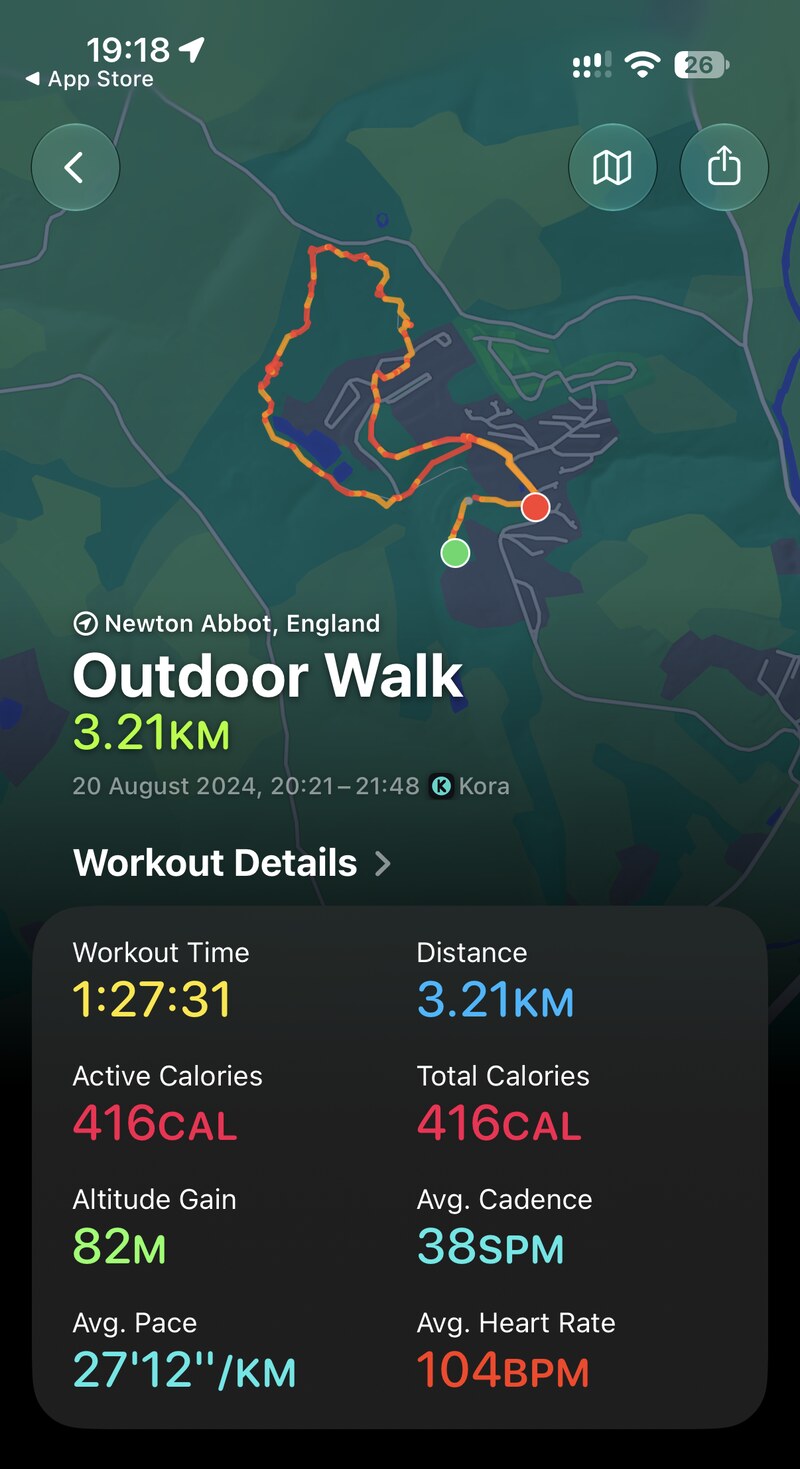
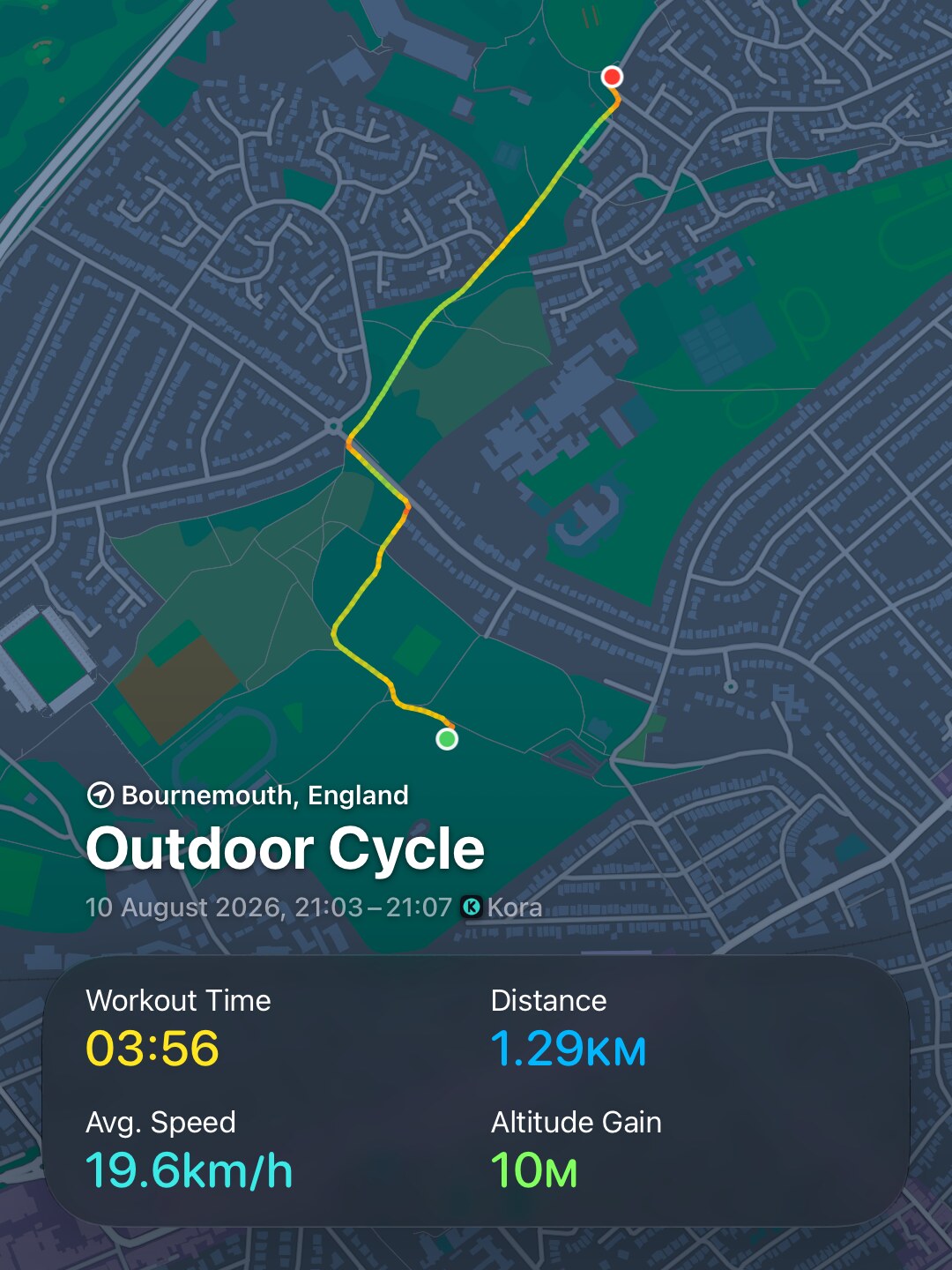
A Garmin activity with its map in Apple Fitness
These are real Garmin workouts that Kora synced to an iPhone, screenshots taken in Apple Fitness. Each shows its route because Kora wrote the route to Apple Health. Look under the workout title: Apple Fitness names the app that wrote the workout, and here the line ends with Kora.
Garmin watches that work with Kora
Kora has been confirmed on real hardware in 21 Garmin watch ranges, and 12 more have synced for at least one owner. The route comes from the GPS points in the watch's own activity file, so an outdoor activity recorded with GPS gets a route and an indoor one does not.
- Descent Mk3 seriesTested
- Epix (Gen 2)Tested
- Fenix 6 seriesTested
- Fenix 7 seriesTested
- Fenix 8 seriesTested
- fenix 9 ProTested
- fenix ETested
- Forerunner 165Tested
- Forerunner 255Tested
- Forerunner 265Tested
- Forerunner 570Tested
- Forerunner 645 seriesTested
- Forerunner 955Tested
- Forerunner 965Tested
- Instinct 2Tested
- Instinct 2XTested
- Instinct 3Tested
- Instinct SolarTested
- tactix 7Tested
- Venu 4Tested
- vívomove SportTested
The supported watches page lists the untested ranges as well, and each watch page shows what Kora has read from that range. If your watch is not listed, Kora may still work.
Kora and RunGap compared
RunGap is an established workout manager that connects about 50 services and can write Garmin workouts with route maps to Apple Health. The two apps get your data in different ways, and the table sets out what we could confirm. Garmin Connect is included for reference.
| Garmin Connect | RunGap | Kora | |
|---|---|---|---|
| How it gets the activity | From the watch to your Garmin account | You sign in to your Garmin Connect account and it imports your activities | Reads the watch over Bluetooth |
| Garmin account needed | Yes | Yes | No |
| GPS route in Apple Health | No, Garmin says the track is not written | Yes, its App Store listing says it writes workouts to Health including route maps | Yes, with Kora Pro |
| Cost of writing to Apple Health | Free | Swag Bag subscription: $4.99 a quarter or $14.99 a year in the US | Kora Pro: $24.99 once, $12.99 a year or $2.99 a month in the US |
| Needs your Garmin account online | Yes | Yes, to import | No, the watch syncs to Apple Health over Bluetooth |
| Skips duplicates in Health | Not stated by Garmin | Yes, when a workout has the exact same start time | Yes, when one starts within a minute with a similar length |
Checked 23 November 2026 against RunGap's App Store listing (version 26.17, US prices), RunGap Support, Garmin Support and Kora's own app. Apps change, so check each page for the latest.
RunGap suits people who want one app that gathers workouts from many services and are happy to use a Garmin account. Kora suits people who want the watch read directly, with no account, and Apple Health as the destination. The Garmin to Apple Health guide compares more options.
How Kora writes the route to Apple Health
Kora writes a real workout route, and Apple Fitness shows who wrote it: the line under the workout title ends with Kora. After it saves the workout, it builds a route from the GPS points in the watch's activity file and attaches it to that workout in Apple Health. The map is stored in Apple Health itself, which is why Apple Fitness and any other app you allow to read routes can show it.
These are the rules Kora follows.
- A route needs GPS points in the activity file. An activity with none is written as an indoor workout with no route, and points at 0,0 or outside valid coordinates are dropped.
- The workout is saved first. If the route cannot be attached, the workout stays in Health without its map.
- Health refuses workout writes while the phone is locked. Kora counts that attempt as not done and tries again on a later sync.
- Before writing, Kora looks for a workout from any app that starts within a minute of the Garmin one and runs for a similar length. If it finds one, it skips the activity. That includes a copy Garmin Connect already sent, which has no map. To have Kora write your new workouts, switch off Workouts for Garmin Connect in Health, under Sharing, Apps.
- Reading and showing the activity in Kora is free. Writing it to Apple Health, route included, is part of Kora Pro, as the free and Pro page lists.
- Kora asks for permission to write workout routes with the other Health types when you turn Apple Health on.
There is more on how Kora reads the watch in how Kora works, and on leaving Garmin's app in using a Garmin watch without Garmin Connect. HRV reaches Apple Health the same way, as Garmin HRV in Apple Health explains.
Check it yourself
- Open Health, tap Browse, then Activity, then Workouts, and open a Garmin workout. The route map is on the workout's page, and the source is named beside the date.
- Tap Sharing, then Apps, then Kora. Workout Routes is listed among the data Kora can write.
- Open the Fitness app and tap the same workout in your history to see the map there.
Questions
Why does my Garmin workout have no map in Apple Fitness?
Garmin Connect does not write the GPS track to Apple Health. Garmin's support page says any GPS track attached to a workout is not written, so the workout arrives without a route and Apple Fitness has no map to show.
Does Kora need a Garmin account or Garmin Connect to write routes?
No. Kora reads the activity file from the watch over Bluetooth and writes the workout and its route to Apple Health from your iPhone.
Is writing GPS routes to Apple Health free in Kora?
Reading your watch and seeing activities in Kora is free. Writing to Apple Health, routes included, is part of Kora Pro.
Will Kora add a map to a workout Garmin Connect already sent to Apple Health?
No. Kora skips an activity when Health already holds a workout that starts within a minute of it and runs for a similar time, whichever app wrote it. Turning off Workouts for Garmin Connect in Health stops new copies without maps.
Why does a treadmill or pool workout have no route?
A route is built from GPS points in the activity file. An activity with no GPS fix is written as an indoor workout with no route.
How can I check that Kora wrote a real route?
Open Health, tap Browse, Activity, Workouts, then a Garmin workout, and look for the map and for Kora as the source. In Health, Sharing, Apps, Kora, Workout Routes is listed among the data Kora can write.
Sources
- Garmin Support: Sharing Your Garmin Connect Data With Apple Health. The data list, the GPS track, the foreground requirement and the heart rate limit.
- Apple Developer Documentation: Creating a workout route, Reading route data and HKWorkoutRoute.
- RunGap: App Store listing for route maps, the Swag Bag subscription and US prices.
- RunGap Support: Using Garmin Connect with RunGap (updated 23 August 2024) and Using Apple Health with RunGap (updated 19 February 2024).
Kora is an independent app. It is not affiliated with, endorsed by or connected to Garmin Ltd., RunGap or Apple Inc. Garmin and Garmin Connect are trademarks of Garmin Ltd. Apple Health and Apple Fitness are trademarks of Apple Inc. Kora gives wellness information only and is not a medical device.